Have you heard about fixed wireless internet? It provides broadband services to homes and businesses by transmitting a signal from a nearby tower. Setting up this type of internet service is much less resource-intensive than other types of services that offer fast internet speeds, like cable.
Because of this, fixed wireless internet is becoming an increasingly popular option in rural areas, where the options for broadband-speed internet are few and far between.
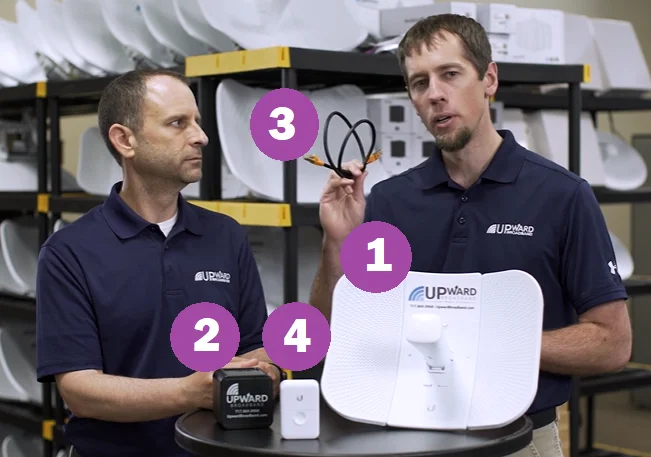
But what does it take to get fixed wireless installed in your home or business? In this blog, we’ll cover the four pieces of fixed wireless broadband equipment you’ll need to get connected.
Fixed Wireless Internet Equipment: The 4 Components You Need
- A Fixed Wireless Broadband Antenna
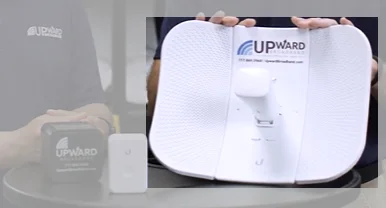
First and foremost, your fixed wireless setup will need an antenna. This device, typically about the size of a shoebox, receives the wireless signal from the local tower.
Sometimes called a subscriber unit or radio transceiver, this fixed wireless broadband antenna is the most visible piece of equipment on your property and the component your provider installs and aligns on your behalf.
Where is this antenna located? That depends on your property and the location of the fixed wireless tower. To maximize signal strength, the antenna needs to be situated in the direct line of sight of the tower.
Traditionally, because fixed wireless broadband transmits internet services via radio waves, anything that came between the antenna and tower could impact the wireless connection. While hills still block signal, recent equipment updates at Upward Broadband have made line of sight not as critical in relation to trees and buildings, expanding availability significantly.
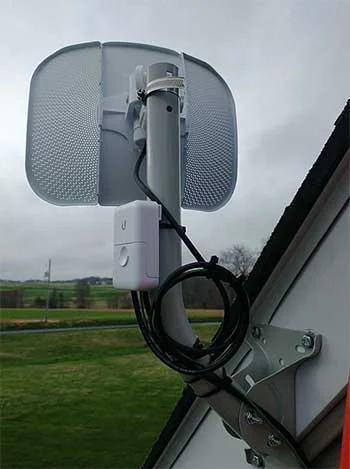
The antenna is placed on the roof with the front pointed towards the tower for most homes and businesses. In some cases, the antenna can be mounted on a pole if the roofline doesn’t offer adequate access to the tower.
Your fixed wireless provider should supply this antenna. Prices and purchase options will vary from company to company. At Upward Broadband, the cost of the antenna is covered in our activation fee, which is a one-time payment that covers the installation.
One last thing to note about the antenna is that it is installed in a secure, stable way so it won’t move around in high winds. The weather won’t directly impact your fixed wireless internet signal, and it will still work if it’s stormy, raining, or damp. However, if heavy winds blow the antenna out of alignment with the tower, you may experience some connectivity issues.
Please note that antennae are installed with this in mind, so they’re mounted in a very secure way. Having your service disrupted in this way is extremely rare.
2. A Router to Distribute the Internet to Your Device

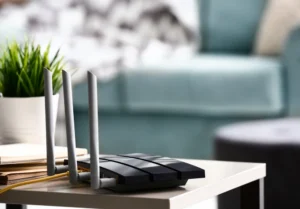
Another essential item that will be included with your fixed wireless equipment is a router. Routers are standard when it comes to most types of internet services. These devices are what dispatch the internet signal to your devices.
Note: You may see this referred to as a “fixed wireless modem” in some contexts. In a fixed wireless setup, the outdoor antenna receives the signal from the tower, and the indoor router (sometimes a modem-router combination) distributes that connection to your devices.
Specific routers are needed to get the best connections. If you bought a router for your cable or satellite internet, you might not be able to use that same router for your fixed wireless connection.
Your fixed wireless provider will have a list of approved routers you can use with their service. Here’s a link to Upward Broadband’s recommended routers.
You can either buy a router off your service provider’s list and have them set it up for you, or you can rent a router from your service provider. This should be just a few dollars and will be tacked onto your bill each month.
You may be wondering whether or not your router will provide Wi-Fi. This will depend on the router itself. Many modern routers are equipped to supply wireless internet. And if you install fixed wireless with Upward Broadband, all of our approved routers will provide Wi-Fi to your connected devices with no need for additional equipment.
3. CAT5e Ethernet Cable to Connect the Equipment
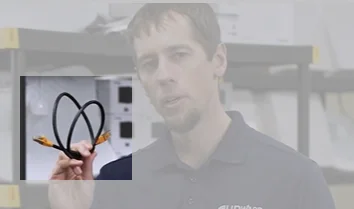
A CAT5e Ethernet cable is what connects your fixed wireless internet equipment. It transfers the internet signal from the outdoor antenna to your indoor router. Most installations today use CAT5e or CAT6 cable, which supports the higher speeds of modern fixed wireless service tiers.
These cables can be installed in a variety of ways to ensure they’re safe and out-of-the-way, keeping your home or business looking neat.
4. A Surge Protector to Protect the Equipment

To keep your equipment safe, your fixed wireless setup should also include a surge protector. This will keep the equipment safe in the event of an electrical surge. It will also help protect your electrical outlets and make your building a little bit safer.
There’s no additional risk of adverse reactions from a power surge if you have fixed wireless internet equipment installed. However, it never hurts to be safe!
Your Fixed Wireless Internet Equipment
With just four components, getting fixed wireless internet installed is a pretty simple process. In most cases (and in the case with Upward Broadband), your service provider will take care of the installation, and they’ll provide the equipment needed to get you connected.
While the antenna does need to be located within line of sight of the tower that’s transmitting the wireless network, the equipment should fit into your home or business in a reasonably discreet manner with no unsightly equipment getting in your way.
Once these four items have been properly installed, you’ll have full access to your high-speed wireless internet service!
Get Fixed Wireless Internet in Pennsylvania
If you’re located in south central PA – or even in our most recently added service areas, Hancock, MD and Berkley Springs, WV – and interested in fast, reliable fixed wireless internet, check out our coverage map and speed packages. We’d love to provide you with Internet Without The Hassle.

Frequently Asked Questions About Fixed Wireless Internet Equipment
Does fixed wireless internet require a separate modem?
Fixed wireless setups typically don’t use a traditional cable modem. Instead, the outdoor antenna acts as the signal receiver and feeds your connection directly into a router. Some providers supply a combined modem-router unit. If you’ve seen the term “fixed wireless modem,” it usually refers to the radio transceiver built into the antenna housing.
Can I use my own router with fixed wireless internet?
In most cases, yes, but your router needs to be compatible with your provider’s equipment. Upward Broadband maintains a list of approved routers that have been tested for compatibility and performance. Using an unapproved router may result in slower speeds or connectivity issues.
How long does fixed wireless internet equipment installation take?
A standard fixed wireless installation typically takes around two hours. A technician will mount the outdoor antenna, run the Ethernet cable into your home, connect and configure your router, and test the connection. Upward Broadband handles the full installation so you don’t need to source or set up any equipment on your own.
Does weather affect fixed wireless equipment?
Fixed wireless equipment is designed for outdoor conditions and handles rain, snow, and wind with very few to no issues. In most cases, your connection won’t be affected by weather at all. If heavy winds knock the antenna slightly out of alignment with the tower, you may notice brief slowdowns, but antennas are mounted securely to prevent this. As a result, weather-related outages are rare.
What’s the difference between a fixed wireless antenna and a satellite dish?
A fixed wireless antenna communicates with a ground-based tower, typically within a few miles of your home. That short distance means lower latency, more consistent speeds, and far less weather sensitivity. A satellite dish communicates with a satellite orbiting Earth, resulting in latency of 600ms or more and greater disruption during heavy storms.